Chapters
Bevy Fynix
Bevy Fynix is the Bevy backend for Fynix. Nodes are entities and the world is Bevy’s World. On top of that, it ships elements written against bevy_ui (Label, Frame, Icon), composites (row, column, button, foldable), the token traits they read, and the states rules wait on.
This page assumes a working Bevy project. If you don’t have one yet, Bevy’s own Quick Start guide walks through creating one.
Add the Crate
cargo add bevy_fynix| Bevy | Fynix | Bevy Fynix |
|---|---|---|
| 0.19 | 0.0.1 - 0.0.2 | 0.0.1 - 0.0.2 |
Write a Theme
Views ask for roles, never raw colours, so an app brings a theme: any type that implements the token traits its views read. The built-in views read TextTokens, SurfaceTokens, SpacingTokens and MotionTokens.
use std::time::Duration;
use bevy::color::Color;
use bevy_fynix::tokens::{
    Curve, Motion, MotionTokens, SpacingTokens, SurfaceTokens,
    TextTokens, Tone,
};

struct MyTheme;

impl TextTokens for MyTheme {
    fn tone(&self, _: Tone) -> Color {
        Color::WHITE
    }
    fn body_size(&self) -> f32 {
        14.0
    }
    fn small_size(&self) -> f32 {
        11.0
    }
}

impl SurfaceTokens for MyTheme {
    fn fill(&self) -> Color {
        Color::BLACK
    }
    fn hover(&self) -> Color {
        Color::BLACK
    }
    fn panel(&self) -> Color {
        Color::BLACK
    }
    fn accent(&self) -> Color {
        Color::WHITE
    }
}

impl SpacingTokens for MyTheme {
    fn gap(&self) -> f32 {
        8.0
    }
    fn row(&self) -> f32 {
        24.0
    }
    fn radius(&self) -> f32 {
        4.0
    }
}

impl MotionTokens for MyTheme {
    fn motion(&self, _: Motion) -> Curve {
        Curve {
            duration: Duration::from_millis(180),
            ease: |t| t,
        }
    }
}
Add the Plugin
FynixPlugin<T> keeps every mounted view in step with the world each Update, for views built with the theme T. The theme itself goes in as the Theme<T> resource.
use bevy::DefaultPlugins;
use bevy::app::{App, Startup};
use bevy_fynix::{FynixPlugin, Theme};

fn main() {
    App::new()
        .add_plugins((DefaultPlugins, FynixPlugin::<MyTheme>::default()))
        .insert_resource(Theme(MyTheme))
        .add_systems(Startup, setup)
        .run();
}
Mount a View
mount builds a view at the root of the UI. Here, a heading and a button whose label turns accent on hover.
use bevy::camera::Camera2d;
use bevy::ecs::world::World;
use bevy_fynix::tokens::{Motion, Tone};
use bevy_fynix::views::{FrameProps, Label, button, column, label};
use bevy_fynix::{Bevy, Cx, Hovered, ScopedExt, StateExt, mount};

fn setup(world: &mut World) {
    world.spawn(Camera2d);
    mount::<MyTheme>(
        world,
        column((
            label("Settings").size(20.0),
            button(label("Save"))
                // Every label in the button turns accent on hover.
                .when::<Hovered, _>(|cx: &mut Cx<Bevy, MyTheme>| {
                    cx.set::<Label>(|l, _| l.tone(Tone::Accent));
                })
                .transition(Motion::Interact),
        ))
        .gap(8.0),
    );
}
What Ships
Hovered,Pressed,Entering,Leaving: states for.when::<S, _>(..), and any component of your own works too. A view akeyedoreachbuilds later keepsEnteringuntil its space has expanded, so it fades in last, and a view they drop getsLeaving, then collapses.ReducedMotionskips all of it.ghost,tint,icon_button,primary,danger,menu_bar,segment: button looks, as bundles for.rules(..). Onlyicon_buttonandtintnever have a surface.tinted_icon: a button of one icon in thetintlook, for an action beside content, such as a plus that adds to a list.revealed: a divider look that draws only while hovered orDragging.popup: a menu surface hung off a point, over a backdrop that dismisses it when pressed.DockPlugin: split panes with tabbed areas, from aDockTree.style: builds a look of your own. See Styling.
See Everything at Once
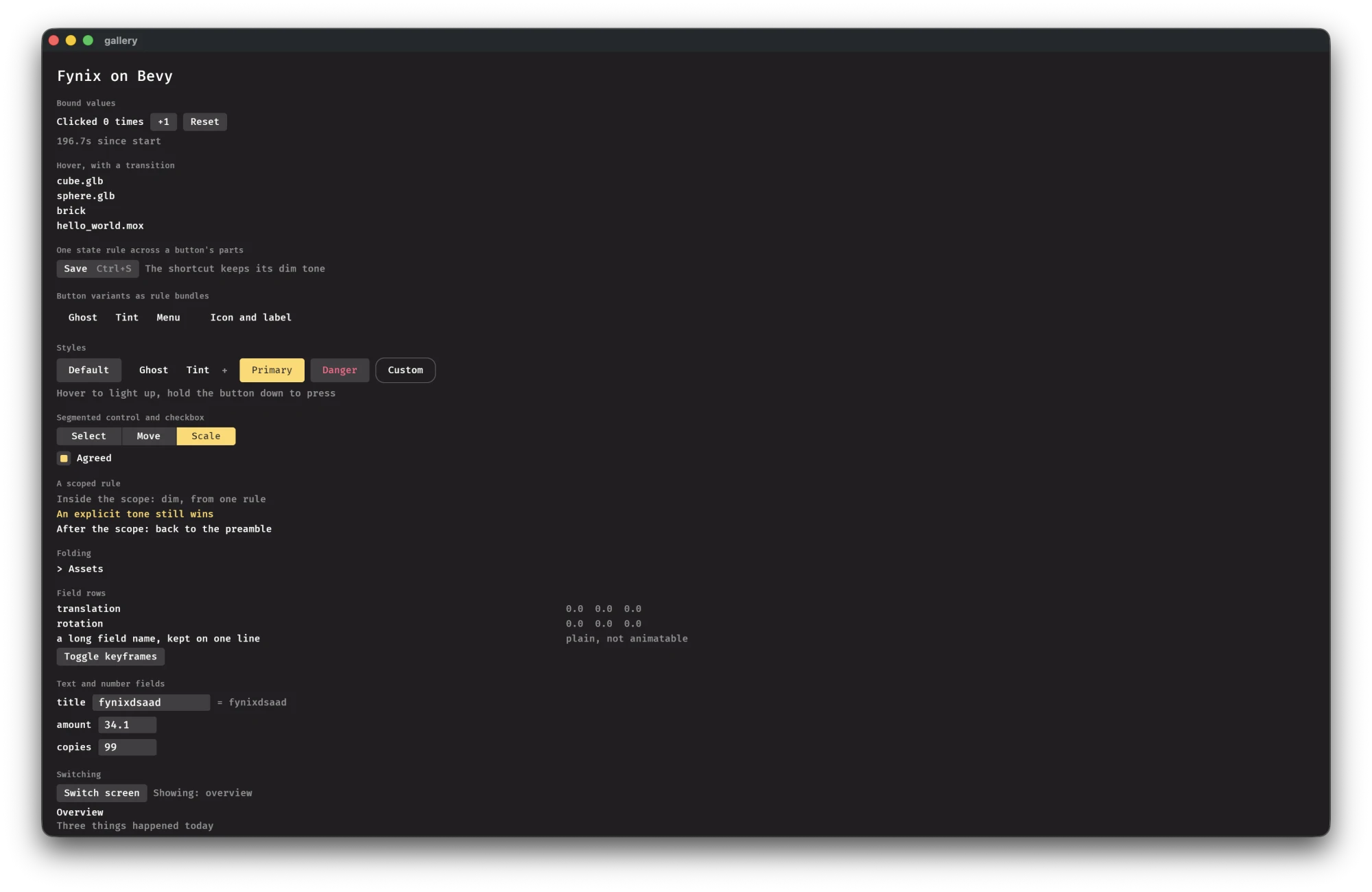
The gallery example shows every idea in one window: themes, set rules, bound labels, hover rules, button looks, folding sections, fields, a keyed list, menus and docking.
cargo run -p bevy_fynix --example galleryIts source is examples/gallery.rs.